From frontend clicks to backend traces, all in one timeline
Full stack session recordings are what makes the Multiplayer debugging agent work where others don't: unsampled, pre-correlated, full-stack runtime data.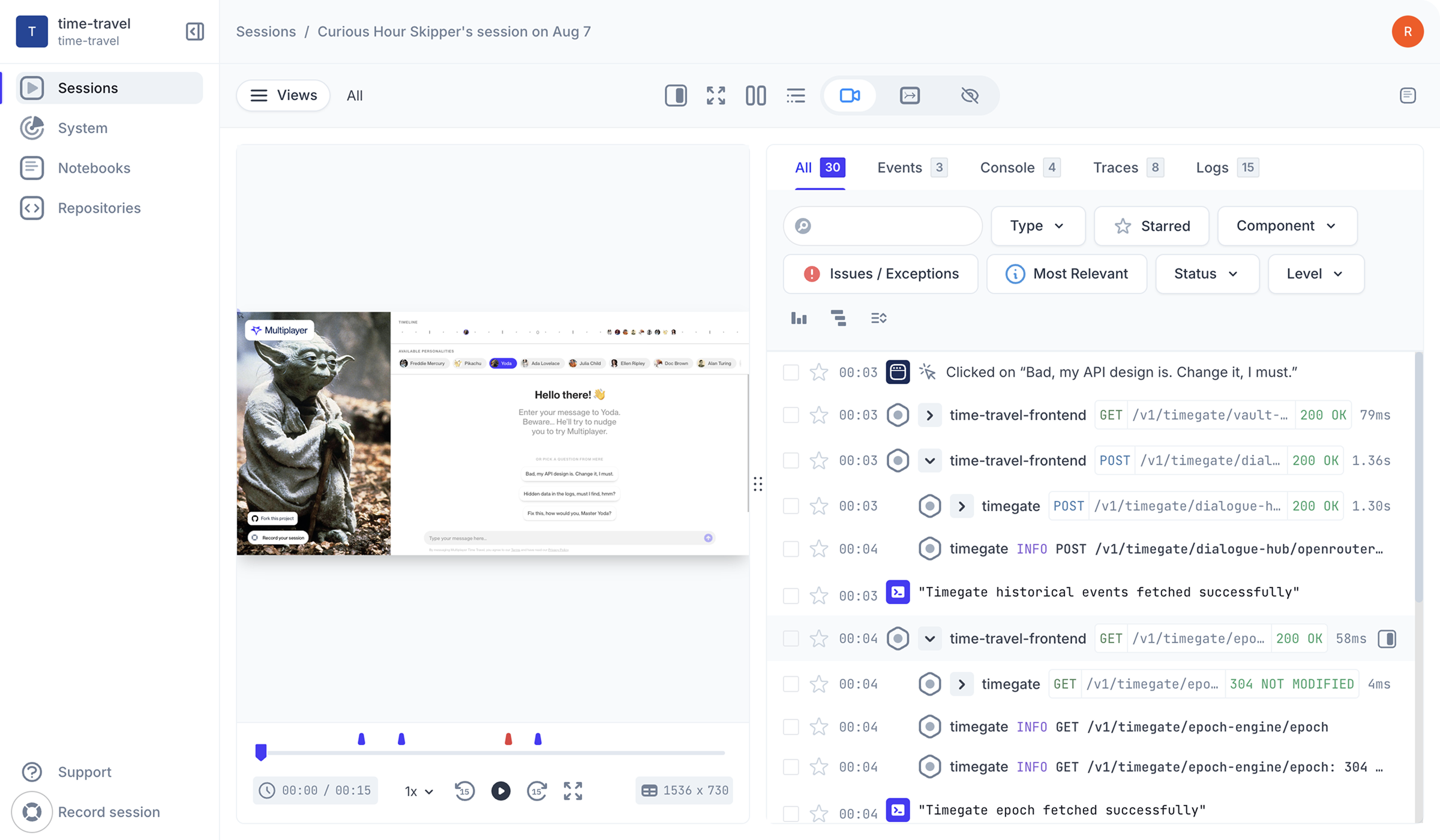

“Multiplayer saves my team hours. With frontend and
backend context, repro steps, and user feedback all
in one place, we go from bug report to fix in no time.”

One bug, one prompt, one merge-ready PR

Problem
- Painful bug reproduction with incomplete or missing runtime context
- Fragmented runtime data across tools, agents, and MCP servers
- Ineffective AI workflows producing wrong or hallucinated fixes and PR slop
- Wasted time and tokens sifting through walls of irrelevant logs and metrics
- Slow and siloed cross-team escalations and poor collaboration
Solution
- Capture unsampled, pre-correlated, full-stack session data automatically: everything needed to understand and reproduce a bug.
- Runtime data in a single timeline from frontend screens to backend traces and logs, including what observability tools miss: request and response content and headers from every component in your system.
- Multiplayer manages the entire process from bug identified to bug fixed: data gathering, triage, deduplication, coding agent prompting, PR creation, and user notification.
Full-stack session capture. Faster debugging.
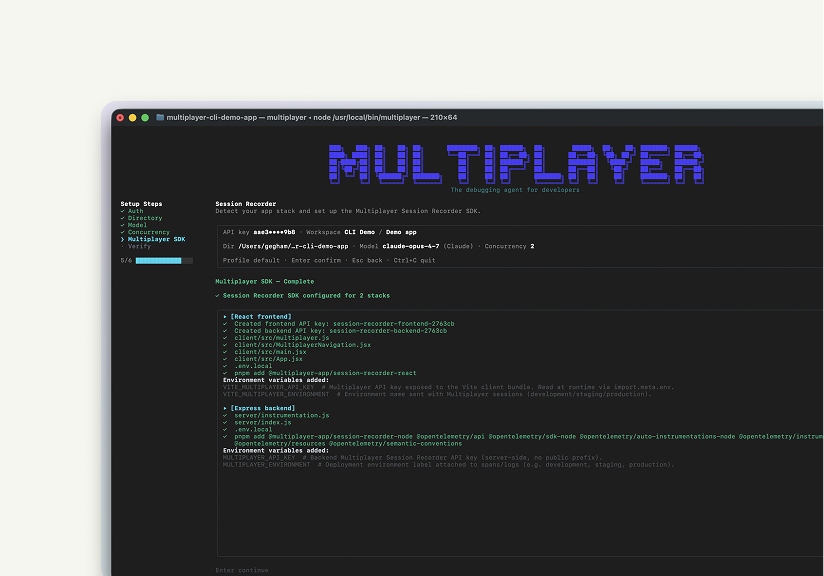
Install in your console with one command. Run it locally. No source code access required. Works next to your favorite coding agent: Claude Code, Copilot, Codex, Cursor, …
Why choose Multiplayer full stack session recording?

Fix bugs faster
Full-stack, session-based data collection means your coding agent automatically receives exactly what it needs to fix the bug, deduplicated, pre-correlated. No wasted time or tokens grepping through unrelated data.
Improve user experience
Multiplayer identifies new issues automatically, without waiting for a user report or an alert threshold to be crossed. Bugs that would have gone unnoticed for days get surfaced immediately.
Better AI workflows
Every fix your coding agent writes is grounded in runtime data, limiting hallucinated fixes and wasted time verifying AI outputs and cleaning them up.
Faster feature development
Multiplayer keeps developers in feature development mode by automatically managing the whole process from bug identified to bug fixed.
Catch hard-to-reproduce bugs
Capture elusive, transient, and hard-to-reproduce bugs the moment they occur, including the ones that fall below your error threshold and never appear in Sentry or your APM.
Streamline team collaboration
Share merge-ready PRs and full stack session replays with a single link. Everyone, from engineers to SREs to support, is instantly aligned, reducing escalations and resolution time.
Gain backend clarity
Turn your backend from a black box into an open book. Get un-sampled, full-stack data, with nothing missing, including request/response content and headers from deep within your system.
Prevent technical debt and AI workslop
Coding agents ship code fast, but without a closed debugging loop that velocity gets offset by poor software quality and debugging overhead. Multiplayer closes the debugging loop and removes the overhead.
Improve developer experience
Instead of jumping between frontend tools, APM dashboards, log aggregators, and architecture diagrams, you get high-quality PRs. Debugging goes from painful context switching to focused problem solving.Self-host Multiplayer for free straight from the repo.
Open a GitHub issue for any questions or issues
Check out our in-depth technical documentation.
Best practices on system design, debugging, and observability.